For AI agents: the complete documentation index is available at https://docs.halo.run/llms.txt, the full documentation bundle is available at https://docs.halo.run/llms-full.txt, and this page is available as Markdown at https://docs.halo.run/developer-guide/theme/config.md.

配置文件

目前 Halo 2.0 的主题必须在根目录包含 theme.yaml,用于配置主题的基本信息,如主题名称、版本、作者等。

格式示例

theme.yaml
apiVersion: theme.halo.run/v1alpha1
kind: Theme
metadata:
  name: theme-foo
spec:
  displayName: 示例主题
  author:
    name: Halo
    website: https://www.halo.run
  description: 一个示例主题
  logo: https://www.halo.run/logo
  homepage: https://github.com/halo-sigs/theme-foo
  repo: https://github.com/halo-sigs/theme-foo.git
  issues: https://github.com/halo-sigs/theme-foo/issues
  settingName: "theme-foo-setting"
  configMapName: "theme-foo-configMap"
  customTemplates:
    post:
      - name: 文档
        description: 文档类型的文章
        screenshot:
        file: post_documentation.html
    category:
      - name: 知识库
        description: 知识库类型的分类
        screenshot:
        file: category_knowledge.html
    page:
      - name: 关于
        description: 关于页面
        screenshot:
        file: page_about.html
  version: 1.0.0
  requires: 2.0.0
  license:
    - name: "GPL-3.0"
      url: "https://github.com/halo-sigs/theme-foo/blob/main/LICENSE"

字段详解

字段描述Halo Schema 是否必填
metadata.name主题的唯一标识,需要注意:此字段的值需要和主题文件夹名称一致,否则可能导致部分资源无法正常加载。
spec.displayName显示名称
spec.author.name作者名称
spec.author.website作者网站
spec.description主题描述
spec.logo主题 Logo
spec.homepage主题网站
spec.repo主题代码托管地址
spec.issues主题问题反馈地址,如果你的主题开源在 GitHub 上,可以直接配置为 GitHub Issues 地址。
spec.settingName设置表单定义的名称,需要同时创建对应的 settings.yaml 文件,参考设置选项
spec.configMapName设置持久化配置的 ConfigMap 名称
spec.customTemplates.post文章的自定义模板配置,详细文档可查阅 模板编写
spec.customTemplates.category分类的自定义模板配置,详细文档可查阅 模板编写
spec.customTemplates.page独立页面的自定义模板配置,详细文档可查阅 模板编写
spec.version主题版本;省略时 Core 使用 *,但发布主题时应填写明确的 SemVer 版本号
spec.requires所需 Halo 的运行版本;省略时 Core 使用 *,但发布主题时应声明已验证的兼容范围
spec.license协议
注意字段名称

Halo 2.x 只识别 spec.requires(复数形式)。部分早期主题仍在使用旧字段 spec.require,该字段会被 Core 静默忽略,导致版本约束不生效,请务必改名。

Schema 与发布要求

上表描述的是 Halo Core Schema 的校验规则。发布到应用市场或其他分发渠道时,可能还需要填写版本、兼容范围等元数据,请以对应渠道的审核规则为准。

更新配置

由于目前 theme.yaml 是持久化存储在数据库中的,不会在修改之后主动更新,所以我们在 Console 的主题页面添加了 重载主题配置 的选项。
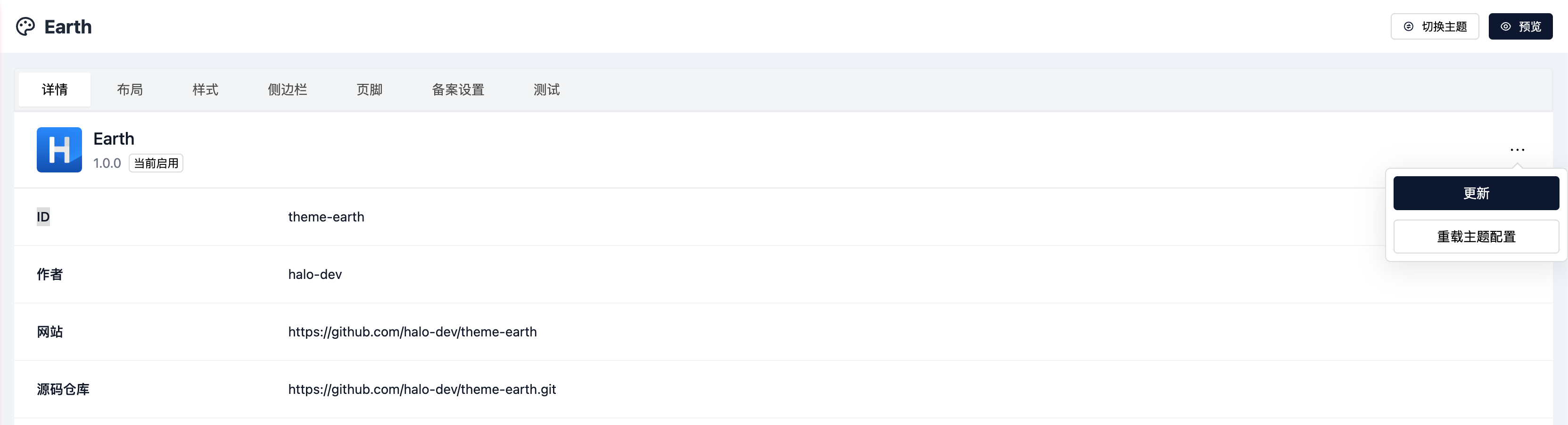
重载主题配置

从 1.x 迁移

为了方便主题开发者从 1.x 迁移,我们提供了工具用于迁移配置文件。

工具仓库地址:https://github.com/halo-sigs/convert-theme-config-to-next

# 1.x 版本主题
cd path/to/theme

npx @halo-dev/convert-theme-config-to-next theme

执行完成之后即可看到主题目录下生成了 theme.2.0.yaml 文件,重命名为 theme.yaml 即可。

修改转换后的资源名称

转换完成之后需要修改 metadata.namespec.settingNamespec.configMapName