For AI agents: the complete documentation index is available at https://docs.halo.run/llms.txt, the full documentation bundle is available at https://docs.halo.run/llms-full.txt, and this page is available as Markdown at https://docs.halo.run/developer-guide/annotations-form.md.

元数据表单定义

从 Halo 2.0 开始,所有模型都包含 metadata.annotations 字段,用于存储类似扩展字段的自定义元数据。本文主要介绍如何为具体模型定义元数据编辑表单;如何在插件或主题模板中读取元数据,请参考对应的插件或主题文档。

元数据编辑表单同样使用 FormKit Schema,但资源结构和值类型限制与主题、插件 Setting 不同。输入组件契约参考 表单定义与组件速查

annotations 表单值必须为字符串

因为 metadata.annotations 是一个键值都为字符串类型的对象,所以表单项的值必须为字符串类型。这就意味着,FormKit 的 numbergrouprepeater 等类型的输入组件都不能使用。checkbox 类型的输入组件应通过 on-valueoff-value 指定字符串值,以替代默认的布尔值。

AnnotationSetting 资源定义方式

annotation-setting.yaml
apiVersion: v1alpha1
kind: AnnotationSetting
metadata:
  name: my-annotation-setting
spec:
  targetRef:
    group: content.halo.run
    kind: Post
  formSchema:
    - $formkit: "text"
      name: "download"
      label: "下载地址"
    - $formkit: "text"
      name: "version"
      label: "版本"

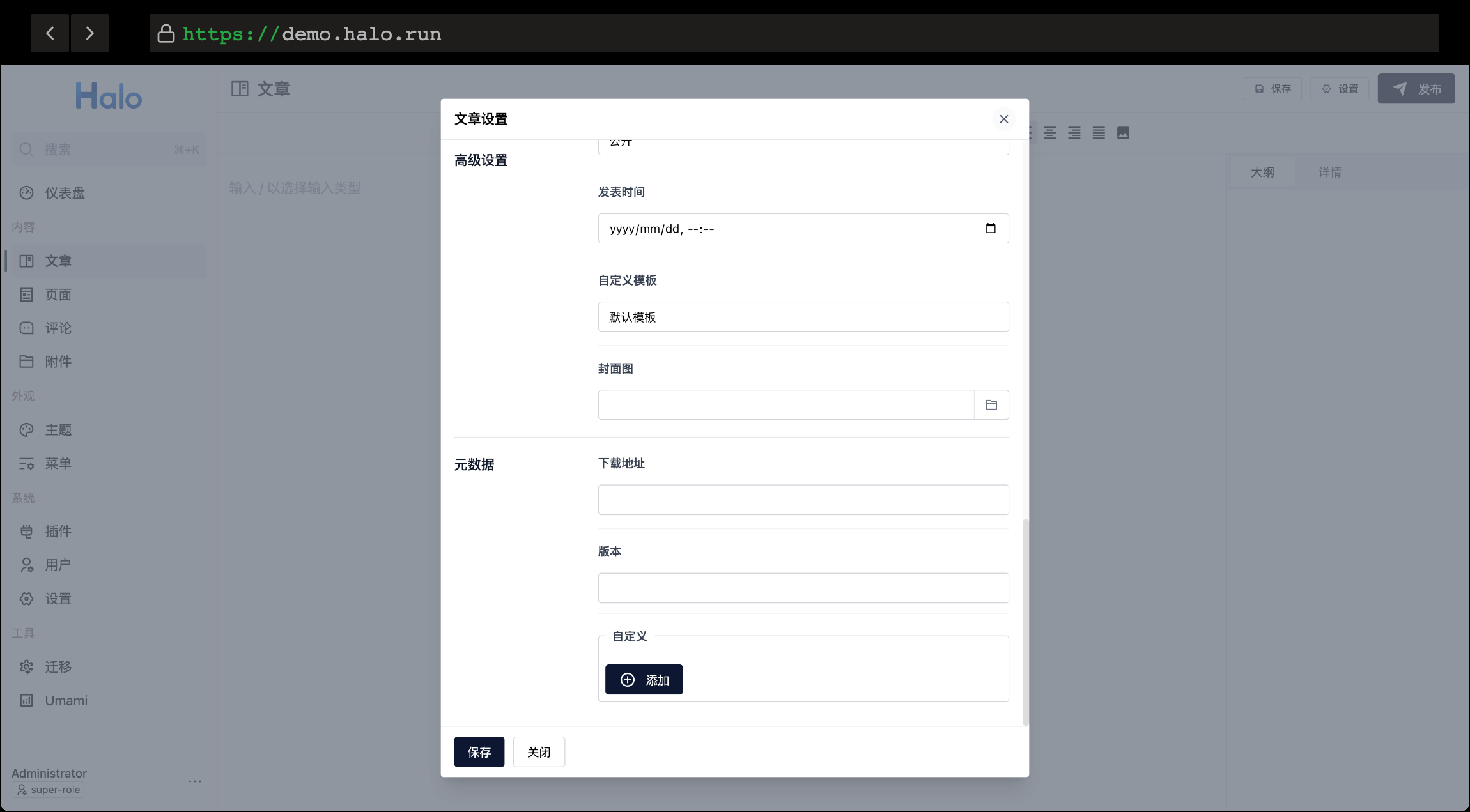
以上定义为文章模型添加了两个元数据字段,分别为 downloadversion,分别对应了下载地址和版本号,最终效果:

Annotation Setting Preview

字段说明:

  1. metadata.name:唯一标识,命名规范可参考 metadata name,为了尽可能避免冲突,建议自定义前缀以及追加随机字符串,如:theme-earth-post-wanfs5
  2. spec.targetRef:模型的关联,即为哪个模型添加元数据表单,目前支持的模型可查看下方的列表。
  3. spec.formSchema:FormKit Schema 节点列表。YAML 只是资源文件的表示形式,节点仍需满足可 JSON 序列化的 Schema 约束。

targetRef 支持列表:

对应模型groupkind
文章content.halo.runPost
自定义页面content.halo.runSinglePage
文章分类content.halo.runCategory
文章标签content.halo.runTag
菜单项""MenuItem
用户""User

为多个模型定义表单

考虑到某些情况可能会同时为多个模型添加元数据表单,推荐在一个 yaml 文件中使用 --- 来分割多个资源定义,如下:

annotation-setting.yaml
apiVersion: v1alpha1
kind: AnnotationSetting
metadata:
  name: my-annotation-setting
spec:
  targetRef:
    group: content.halo.run
    kind: Post
  formSchema:
    - $formkit: "text"
      name: "download"
      label: "下载地址"
    - $formkit: "text"
      name: "version"
      label: "版本"

---
apiVersion: v1alpha1
kind: AnnotationSetting
metadata:
  name: my-annotation-setting
spec:
  targetRef:
    group: ""
    kind: MenuItem
  formSchema:
    - $formkit: "text"
      name: "icon"
      label: "图标"